Four choices make a character
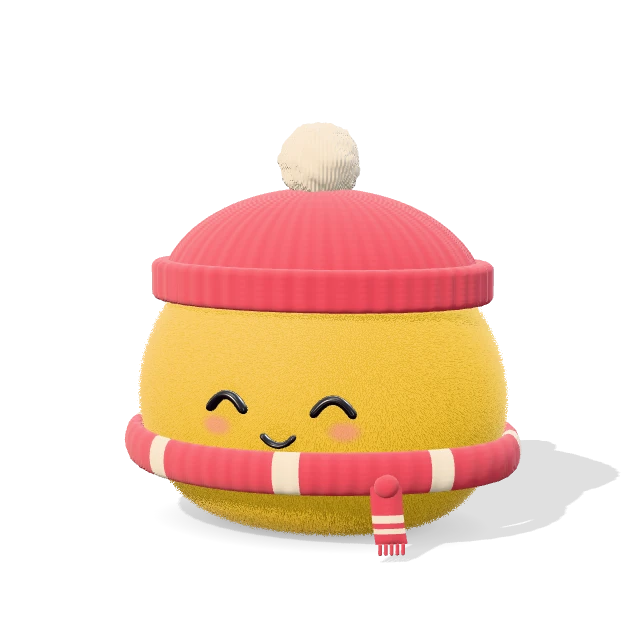
A dot avatar is a small, rounded 3D character made from four decisions, the four steps above. Shape is the body, one of 44: seventeen classic shapes, soft cushions such as the round, the bean and the cloud; eighteen animals, their ears, muzzles and tails blended into one body; six fantasy characters, from a ghost to a one-eyed monster; and a mushroom, a strawberry and a cactus. Color is one of 24 presets or any color you mix yourself. Finish is the surface, from short plush to chrome. Look dresses it: a hat, glasses, an extra such as a scarf, a face, a mouth, blush and lashes.
The 50 looks are starting points, not outfits. Pick one, then change any slot on its own, and the step reads Custom. Counting “none” as a choice, the hat, glasses, extra, face and mouth, with blush and lashes on or off, make 1,735,360 combinations before shape, finish or color come in. Shuffle draws a random character when you would rather react than decide.
The Shape and Look steps start with Boy and Girl. The choice changes only whether eyelashes start on, which they do for Girl, and which looks are listed first. Every look, hat, glasses, extra, face and mouth works with either, and the Lashes switch still overrides the default.
Mixing a color of your own
Custom color opens a mixer under the presets. Its sliders set lightness, saturation and hue; saturation is measured against the most vivid version of that hue at that lightness, so every position is a real color your screen can show. Type a hex code or paste any CSS color. Pick from screen samples a pixel where the browser supports it, and Colors from an image finds the six main colors in a picture, processed in your browser and never uploaded. Recent colors stay in a row until you leave the page.
Fourteen finishes, and what each one does to a color
The swatch you pick is the color of the material, not of the final pixels. Light and gloss move it, and every finish moves it differently.
Soft: plush, fluffy, felt and clay
The three fur finishes are stacked shells of strands, darker at the roots than at the tips, so a plush character reads a shade deeper than its swatch, with a pale rim where light catches the edge. Fluffy is the long version and sways while idle motion is on; felt is a short matted fuzz with no shine. Clay has no fur: a satin surface with faint dents and tool marks, and the color stays close to the swatch.
Glazed and matte: ceramic, crackle, speckled, pearl and rubber
Glazed ceramic pools darker and richer in the creases, the way a real glaze collects in hollows, and its highlights go white. Crackle glaze is the same gloss crossed by a web of fine cracks. Speckled stoneware mutes a color with rough grain and dark flecks. Pearl lifts the color toward white and adds a shifting rainbow sheen, so pastels hold up and strong colors wash out. Soft rubber is matte with a faint sheen, the flattest of the five.
Shiny and clear: vinyl, glitter, jelly, glass and chrome
Vinyl is semi-gloss, like a toy figure. Glitter is a clear coat over tiny flakes that sparkle as the character turns. Jelly is see-through and tinted deeper where it is thicker. Glass is clear with a light tint, so much of what you see is the room behind it, and chrome is a mirror tinted by the body color, which is why butter yellow comes out gold. Those two read worst at 32 pixels, where reflection and refraction shrink to noise. For a small avatar, an opaque finish keeps the silhouette.
A profile picture is judged at 32 pixels
Most people will meet your avatar in a comment thread or a chat list, 32 to 40 pixels across, so judge it at that size. Most apps show avatars in a circle, which is what Round profile picture makes; Square profile picture suits the ones that use a rounded square.
Both profile modes put the character on a solid background with 12% padding, so the crop never clips an ear or a hat brim. The default background is a pale tint of the body color; change it in the download dialog if your character is pale too. A transparent PNG is cropped to the character, but it shows whatever sits behind it, and a dark character on a dark theme disappears.
Every image is square, at 512, 1024 or 2048 pixels; 2048 is for print or a large hero. To turn the PNG into a site icon, take it to the favicon generator.
An avatar for an AI agent, an assistant or a bot
Give a bot or an assistant a shape nobody will mistake for a person: the robot, the alien or the ghost. Keep one character per agent, so people learn which one is answering, and use the look to say what it does: a headset for support, a visor for a technical helper, a beret for a creative one. Export a round profile picture for the chat window and a transparent PNG for the help pages.
For a mascot, keep the link, not just the PNG
A PNG is one size from one angle; the link is the character. Every choice is written into the page’s address, as in ?shape=fox&color=ff9b42&finish=fluffy, and Copy link copies it. Open it next month and the identical character comes back.
For a brand, type its hex code into Custom color, and keep the link in your brand notes next to the logo files.
The 3D file works offline
Download 3D file saves the character as a single HTML file of about 1 MB. Inside are your character, the code that draws it and three.js, the open-source 3D library it runs on, with its MIT license notice intact. It opens in any current browser with no server and no network: drag to turn the character, zoom in and out, and switch the idle motion on or off.
It is not a model file. There is no glTF or OBJ export, so the character cannot be opened in a 3D modeling app or a game engine.
How the characters are drawn
Each body is a signed distance function: a formula that gives, for any point in space, its distance from the surface. Smooth unions blend ears, muzzles and tails into the body, so every character is one continuous form. A background thread turns it into a mesh, so the page keeps responding while a new shape is built. Fur is layered shells: the body drawn again up to 40 times, each layer slightly larger, with strands cut out of it.
That makes this a different kind of 3D character creator from the ones made for games, and a different 3D avatar maker from the ones that model a likeness from a photo. There is no skeleton to pose and no photo to upload.
Using it from the keyboard
Tab reaches the four steps, and Left and Right move between them. In a grid of options the arrow keys move and select in one go, Home and End jump to either end, and Enter or Space selects. With the 3D preview focused, the arrow keys turn the character, plus and minus zoom, and 0 resets the view. The caption and the preview’s label describe the character in words, so a screen reader hears each change. Escape closes the download dialog, and idle motion starts switched off when your system asks for reduced motion.
Nothing is uploaded
Your browser builds and draws the character. The tool requests nothing but its own files from siter.io: the studio, a background worker and three.js, which Download 3D file reads again to pack into the file. Your choices, colors and images are never sent anywhere, and the tool stores nothing on your device: no cookies, no local storage. The only record of your character is the page’s address, which you can share or keep to yourself. The site around the tool loads the same analytics as every other page on siter.io, and the tool itself makes no analytics call.